Tracepoints
The tracepoint sends project variable values to the debug window and continues without waiting for a button. It's useful when you want to watch a running cycle, check if the program passes through a certain branch, or observe a condition that would break a stop.
How to set the tracepoint
- Stop the program.
- In Settings → Program Debugging choose Immediate if you do not want to add delays between blocks.
- Right-click the command and select Add tracepoint.
- Press Run code.
The marked block has an icon with the description Tracepoint – send values and continue. To cancel, use Remove tracepoint in the same menu. Like breakpoints, these tags are stored in the project and are changed before execution.
There can only be one type of point on one block. Adding a tracepoint replaces any breakpoint, and adding a breakpoint replaces the tracepoint.
What values the point captures
Values are read before the indicated command is executed. To see the result of the assignment, place a tracepoint on the next statement that the program actually occurs.
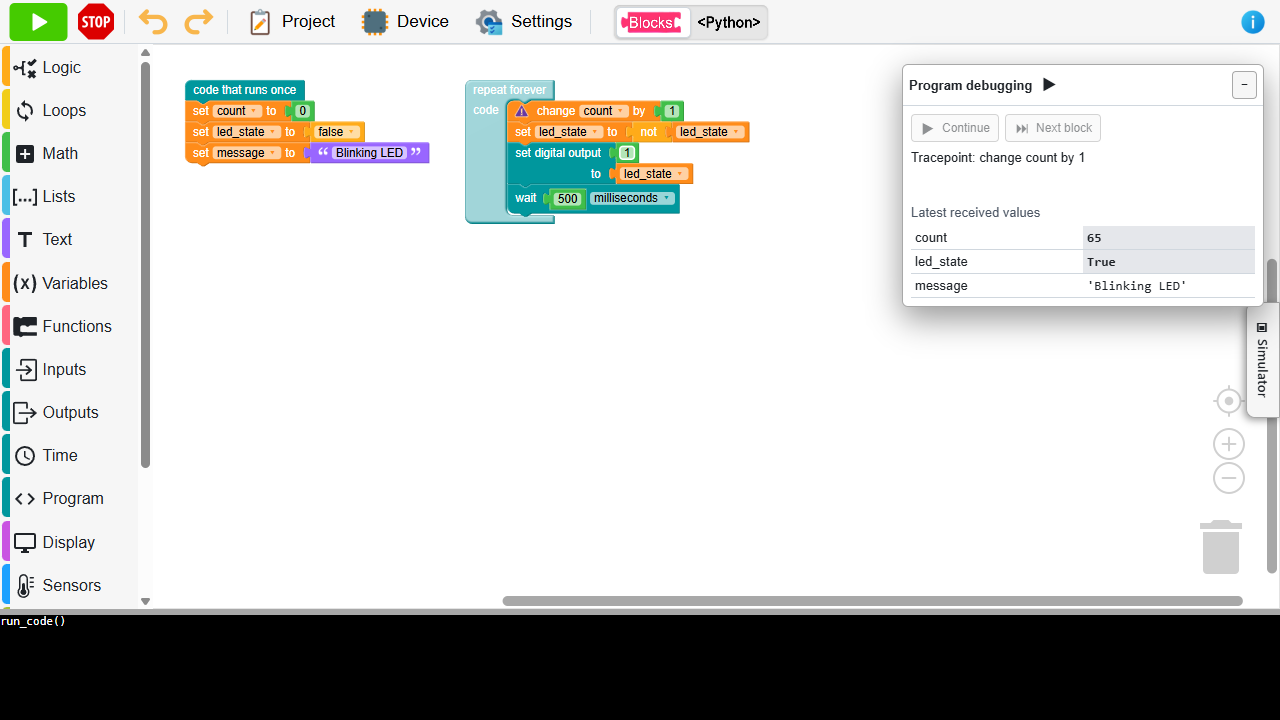
The window displays Tracepoint: with the block name and the table Latest received values. The buttons Continue and Next block are inaccessible at runtime because the program is not waiting for anything. If the project does not contain breakpoints, the switch to stop them is not shown either.
Project variables are tracked together, not just the variable attached to the marked block. Their order and truncation of larger values is explained by debug window.
More points and fast programs
You can mark multiple commands. Each tracepoint reached sends a new frame; the table shows the most recent displayed state and the name of the place it came from. So changing the name of the block can mean alternating different points.
Image sending does not have its own fixed period or the 50ms limit used for just highlighting. Triggered every time a point is reached. But the speed still limits the build and transfer of data and the speed of the program.
The table is not a record of all passes
The browser renders the last available frame on the next screen refresh during fast data feed. Intermediate frames may not be displayed at all. If you are looking for a specific short event, use a breakpoint or save the important state in a project variable.
The point itself does not wait for manual continuation, but it still costs time to get and send values. More variables, larger values, and more points in a fast loop mean more data and more influence on program execution. The Block/… mode additionally adds its own set delays as well as a program with tracepoints.
When to use a pass-through breakpoint
If you want to return to stepping during the same run, prepare breakpoint and temporarily disable Stop at breakpoints. A tracepoint is good for places that only need to send values at a given run. It cannot be changed to a new breakpoint at runtime without restarting the modified program.