Line in framebuffer (fb_line)
What it does: Draws a line between points (x1, y1) and (x2, y2) in the framebuffer.
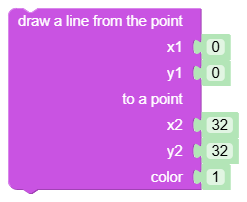
Inputs
px1: X1 start coordinate - integer.py1: X2 start coordinates - integer.px2: X1 end coordinate - integer.py2: Y2 end coordinate - integer.col: Color (0 - black, 1 - white).
Output
- None (statement block).
When to use it
- When you want to draw axes, separators or simple shapes.
- When manually drawing indicators and charts.
Tips and pitfalls
- Coordinates outside the 128×64 framebuffer area are not visible on the display.
- After drawing the line, do not forget to call
oded_refresh, otherwise the change will remain only in memory.
Usage example
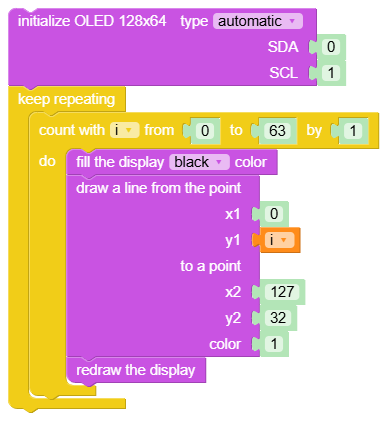
Generated Python example
fbuf.line(int(0), int(0), int(0), int(0), int(0))