Rectangle in framebuffer (fb_rect)
What it does: Draws a rectangle outline at the specified position and with the given width/height.
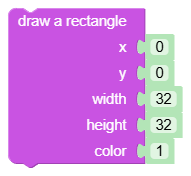
Inputs
px: X coordinate of the upper left corner - integer.py: Y coordinate of the upper left corner - integer.sirka: rectangle width - integer.vyska: rectangle height - integer.col: Color (0 - black, 1 - white).
Output
- None (statement block).
When to use it
- When you want to border a panel, button or area on the display.
- For simple frames and separation of UI parts.
Tips and pitfalls
- The block only draws an outline (
fbuf.rect); for workspace usefb_rect_fill. - Keep the dimensions and coordinates in the 128×64 area so that the entire rectangle is visible.
oded_refreshis needed after framebuffer changes, otherwise the result will not be displayed.
Usage example
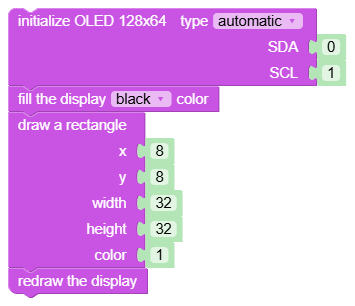
Generated Python example
fbuf.rect(int(0), int(0), int(0), int(0), int(0))