Engines ESP:BIT
These blocks use ESP:BIT hardwired motor outputs. They need the corresponding device libraries. Don't confuse them with the general DC motor initialization where you enter the pins yourself.
DC motor speed (ESP_Bit_dc_motor_speed)
What it does: Selects the MOT A/B motor and sets its speed with the in_speed input, intended for −100 to 100. Zero stops the motor, sign changes direction. The generator prepares both dcmotorlib library objects: A uses GPIO37/38, B uses GPIO39/40.

Stepper Motor Initialization (omg_stepper_init)
What it does: Creates a m object of the AccelStepper library for GPIO37-40 and sets an initial maximum speed of 50 and an acceleration of 100. The step option selects the excitation mode. Initialize once before other blocks of this set.
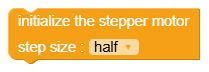
Choosing a step in the current code
The label "half" is assigned to the constant BIPOLAR4WIRE in the block definition, the label "full" to BIPOLAR_HALF4WIRE. These labels are interchanged with the names of the library modes. Take this into account when working with the number of steps; the documentation does not correct this inconsistency in the application.
Maximum Speed (omg_stepper_set_speed)
What it does: Sets m.setMaxSpeed(int(...)) by entering speed. The label recommends 1-250Hz; this is a step rate limit, not a target position setting.

Acceleration (omg_stepper_set_accel)
What it does: Entering accel sets m.setAcceleration(int(...)). The label indicates a range of 1–1000. A higher value means a faster rate change; the engine mechanics must be able to handle the selected start-up.

Set current location (omg_stepper_set_pos)
What it does: Entering pos sets the current position counter. The engine does not physically move to another location. It is suitable, for example, for indicating the mechanically found zero position.

Go to position with waiting (omg_stepper_move_to)
What it does: Sets absolute target pos and waits until distanceToGo() is zero. Other program commands do not run in the meantime.

Move steps with wait (omg_stepper_move)
What it does: Enters a relative displacement pos to the current position and waits for completion. The sign changes direction.

Go to position without waiting (omg_stepper_move_to_nonblocking)
What it does: Sets the absolute target pos and immediately continues with the next command. The movement is served by the library; resetting the target in the loop can change it before it finishes.

Move steps without waiting (omg_stepper_move_nonblocking)
What it does: Enters a relative offset pos and continues without waiting. Don't run it unconditionally every pass if you only want one specific shift.

Stop (omg_stepper_stop)
What it does: Calls m.stop(). While running, the library calculates stops based on acceleration; it is not a command to immediately disconnect power to the motor.

Current Location (omg_stepper_current_pos)
What it does: Returns the current position counter in steps (m.currentPosition()).

Target position (omg_stepper_target_pos)
What it does: Returns the set absolute target position (m.targetPosition()).

Remaining steps (omg_stepper_distance)
What it does: Returns the difference between the target and current position (m.distanceToGo()). Zero means the goal reached, the sign determines the direction of the difference.

The last three blocks return a number; the others are commands. The position counter is not a true mechanical position sensor: it will not detect lost steps by itself. DC and stepper motor use the same motor pins, so do not combine their operation on the same outputs.