DHT11/DHT22 — load new sample (dht_measure)
What it does: Requests new temperature and humidity readings from the DHT sensor and stores them in the library's internal buffer.

Inputs
- No data inputs.
Output
- None (statement block).
When to use it
- In the loop before reading the values using the
dht_read_tempanddht_read_humiditycommands. - After initializing the sensor with the
dht_initblock. - DHT sensors are slow. For DHT22/AM2302, expect a measurement period of around 2 s.
Tips and pitfalls
- Without this block, the old values from the previous measurement are read.
- Don't call him too often. It is convenient to read DHT22/AM2302 about once every 2s. There is no point in calling this function more often, it will always return the same data.
- The library may throw
OSErroron a communication error.
Usage example
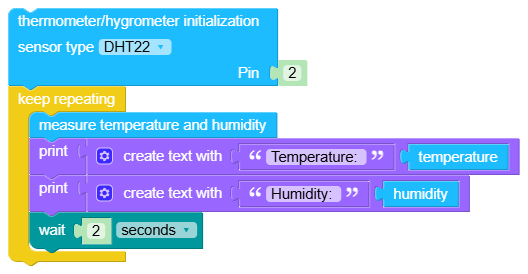
Generated Python example
try:
    dhts.measure()
    time.sleep(1)
except OSError as e:
    print("Error reading DHT")