One-term functions — absolute value, square root, logarithm, exponent
What it does: Applies the selected math function to INPUT. You can choose whether to rotate the number, take its positive value, square it, or calculate the logarithm or power.
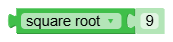
Inputs
- NUMBER: The value for which we want to perform a mathematical operation.
Math operations
Negation (NEG)
- Takes a number and flips its sign.
- Negative becomes positive and positive becomes negative.
Absolute value (ABS)
- Always returns a positive number regardless of sign.
- Like measuring distance - you never say it's "-3 meters". Just 3 meters.
- -7 turns into 7.
Square Root (ROOT)
- Searches for a number that, when multiplied by itself, gives the input value.
- Example on LEGO bricks: if you have 9 bricks and you want to build a square from them, you get a 3 × 3 square.
- This is the square root of:
odmocnina 9 = 3.
Natural Logarithm (LN)
- Logarithm with base e (Euler's number ≈ 2.718).
- Asks "How much do I need to exponentiate e to get this number?"
- Only valid for input > 0.
- Example:
LN(e) = 1,LN(1) = 0
Decimal Logarithm (LOG10)
- Asks "How many times do I have to multiply by 10 to get the input?"
- Example:
- 10 × 10 = 100 →
LOG10(100) = 2 - 10 × 10 × 10 = 1000 →
LOG10(1000) = 3 - Practically tells how many zeros a number has.
Exponential (EXP)
- Exponentiates base e on input.
- Example:
EXP(1) = e ≈ 2,718,EXP(0) = 1
Power of Ten (POW10)
- Exponentiates base 10 per input.
POW10(2)means 10 × 10 = 100.- As if you were adding zeros after the number:
POW10(3) = 1000→ the number 1 changes to 1000 (three zeros added).
Output
- NUMBER: always returns a number.
Tips
ODMOCNINA: only for INPUT ≥ 0LN/LOG10: only work for INPUT > 0- A logarithm is the "opposite operation" of a power.