Settings file section (espide_pv_section)
What it does: Specifies the INI section for the following variables inside the save variables to file block.
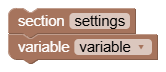
Options and connections
Write the name of the section in the text field, for example ovladani. After the block, connect items variable. The section continues until the next item section or the end of the list. Both the default and empty names mean settings.
The block has no value output and does not perform a file operation itself. It just arranges the content when saving.
Tips and pitfalls
- Sections make the file clearer, they do not create folders or separate variable spaces in the program.
- Use simple one-line names without square brackets.
- Load block reads all sections. If they contain the same variable name, the later loaded value will overwrite the earlier one.